Introducing Tracking WCAG: WCAG 3 and 2.2 in Plain English
Every accessibility professional has a version of the same conversation. A designer, developer or product manager asks, “What does WCAG actually want me to do here?” and you open the spec, scroll past three paragraphs of normative language, and translate it on the spot.
I’ve had that conversation hundreds of times. Tracking WCAG is my attempt to write the translation down once, for everyone, and keep it current.
What it is
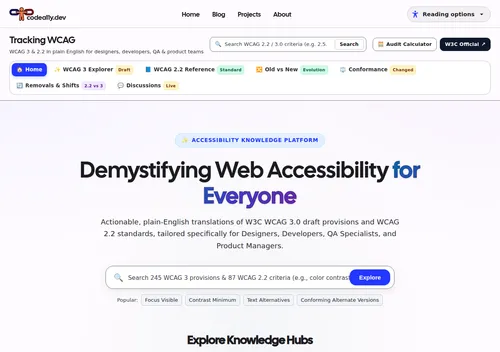
Tracking WCAG is a plain-English reference for two standards at once:
- WCAG 2.2, the standard you’re held to today. All 87 success criteria, each with a summary, what it means for your role, a testing checklist (automated, keyboard and screen reader), and accessible vs. inaccessible code examples.
- WCAG 3.0, the working draft that will eventually replace it. Every provision in the current editors’ draft, with its scope, exceptions, examples and the W3C’s own maturity label (exploratory, developing, refining or mature).
It’s written for the four people who usually end up in that conversation: designers, developers, QA and product managers. Each criterion says what it asks of you, not just what it says.
Why “tracking”?
WCAG 3 is a moving target. Provisions get renamed, merged, split and removed. The conformance model has changed more than once. A static summary would be wrong within a month.
So the site tracks the draft. Once a week an automated job diffs the W3C’s w3c/wcag3 repository against the last run, separates real wording changes from formatting passes, checks every WCAG 2.2 → 3 mapping still points at something that exists, and writes a dated report. When the draft moves, the site moves with it.
That same job pulls in the working group’s GitHub discussions and groups them by provision, so you can see why something is changing, and who is arguing for what, without reading hundreds of issue threads.
Things I use it for
- “Old vs New” comparison. A side-by-side matrix of each WCAG 2.2 criterion and where it lands in WCAG 3. This is the page I send to teams asking “do we need to start over?” (Short answer: no. Most of the work you do for 2.2 carries forward.)
- Removals & Shifts. What WCAG 3 phases out or redesigns, such as conforming alternate versions and strict A/AA/AAA levels, and what replaces them.
- Conformance: what changed. How the draft moved levels off conformance and onto reporting tiers, with a readiness checklist split into start now, cheap hedges and wait for the draft.
- The score calculator. An educational simulation of the scoring prototype, so teams can get a feel for outcome-based auditing. It’s clearly labelled as a prototype, because the scoring model is still under debate.
- Global search. Type “2.5.8” or “target size” and get both the 2.2 criterion and its WCAG 3 counterparts in one list.
A note on accuracy
A site that explains accessibility standards has to be right. Every summary is checked against the W3C source by an automated “red team” test that compares more than 1,700 factual claims with the spec, and each provision links to the primary W3C text so you can check it yourself.
It’s still an educational resource, not legal advice. When a WCAG 3 detail is unsettled, the site says so rather than guessing.
It’s part of codea11y.dev now
Tracking WCAG started as a standalone project with its own look. As of today it shares this site’s header, colours, type and Reading options panel. If you set dark mode or larger text here, it follows you there, because both sites read the same saved setting. I wrote about how that works in Three Projects, One Accessible Home.
Try it
- Open Tracking WCAG
- Browse the source on GitHub
If you find a summary that’s wrong or unclear, open an issue. That’s exactly the feedback it needs.